%20--%3e%3cdefs%3e%3cstyle%3e%20.st0%20{%20fill:%20none;%20stroke:%20%230f172a;%20stroke-linecap:%20round;%20stroke-width:%205.5px;%20}%20.st1%20{%20fill:%20%2310b981;%20}%20%3c/style%3e%3c/defs%3e%3cpath%20class='st0'%20d='M2.75,42.01v-20.12C2.75,11.32,11.32,2.75,21.89,2.75s19.14,8.57,19.14,19.14v20.12'/%3e%3cpath%20class='st0'%20d='M14.12,42.01v-13.62c0-4.29,3.48-7.78,7.78-7.78s7.78,3.48,7.78,7.78v13.62'/%3e%3ccircle%20class='st1'%20cx='21.89'%20cy='11.74'%20r='4.98'/%3e%3c/svg%3e)
12 Week Audit Readiness Checklist for Finance Teams: With IT Trails

You are audit-ready when every financial figure ties to source documents, every control has evidence it operated, and your prepared-by-client list is sitting in one shared folder before the auditor asks for it. The three moves to make right now: assemble your PBC list, centralize documents into one reviewer-facing folder, and resolve your oldest unreconciled items first. Everything else on the checklist below builds from those three actions.
TL;DR:
- Organize source documents into a centralized folder with consistent naming conventions to speed up auditor review and reduce back-and-forth delays.
- Prepare detailed schedules such as bank reconciliations, aging reports, fixed asset, debt, and revenue documents, with clear sign-off lines and variance explanations upfront.
- Gather control evidence across segregation of duties, approval trails, access controls, and system change logs, including documented compensating controls for identified gaps.
- Maintain comprehensive, tamper-resistant audit trails with synchronized timestamps, outcome records, and subject details, verified by cryptographic methods when possible.
- For operational and safety audits, implement digital site access and sign-in systems to provide timestamped, verifiable attendance records alongside financial documentation.
Table of Contents
- Your Audit Readiness Checklist by Audit Type
- What Financial Documents Do Auditors Actually Want?
- What Controls Evidence Do Auditors Test?
- What Should Your Audit Trail Include?
- What Makes a Reconciliation Audit-Ready?
- When Do PCAOB and SOX Requirements Change Your Prep?
- What Should Be on Your PBC List?
- A 12-Week Plan to Get Audit-Ready
- Score Yourself: Are You Actually Ready?
- Why Physical Presence Evidence Belongs in Your Audit File
- Turning Site Access Records Into Audit Evidence
- Sources
- FAQ
Your Audit Readiness Checklist by Audit Type
Not every audit pulls from the same document stack. A financial statement audit leans hardest on reconciliations and revenue support. A compliance audit wants policy evidence and signed acknowledgments. An operational audit cares more about process controls than ledger detail. PCAOB and SOX engagements add a layer none of the others require: multi-period internal control testing tied to a registered public accounting firm’s methodology.
Here’s the core list that applies across nearly every engagement, grouped by category:
- Financial documents: trial balance, general ledger detail, bank statements, and all supporting reconciliations
- Controls evidence: approval workflows, segregation-of-duties matrices, signed control checklists
- IT and systems: access logs, change logs, user provisioning records, system-generated audit trails
- Governance: board or audit committee minutes, signed management representations, prior-year findings and remediation status
The table below separates what’s mandatory for nearly any audit from what only applies to specific scopes.
Package everything with consistent naming: date, document type, and period, in that order (for example, “2026-Q1-BankRecon-Operating.pdf”). Auditors move faster through a folder organized by financial statement line item than one organized by department, since that mirrors how they actually test balances. A practical audit readiness checklist built around a shared folder and a single point of contact cuts down on the back-and-forth that stretches engagements into extra weeks.
What Financial Documents Do Auditors Actually Want?
Auditors want documents that already reconcile to the general ledger, not raw statements they have to trace themselves. Bank reconciliations need to tie every book balance to the corresponding bank statement, with reconciling items dated and explained rather than left as a lump “in transit” figure.
Beyond the bank reconciliation, build out these core schedules:
- Accounts receivable aging with a documented basis for bad debt reserves
- Accounts payable aging tied to open purchase orders and accrued liabilities
- Fixed asset schedules showing additions, disposals, and depreciation methodology
- Debt schedules with covenant compliance calculations attached
- Equity rollforwards showing every transaction from opening to closing balance
- Revenue support: signed contracts, shipping or delivery confirmation, and invoice-to-cash trails
- Payroll registers reconciled to tax filings (941s, state unemployment reports, W-2 totals)
Every schedule needs a sign-off line: who prepared it, who reviewed it, and on what date. That single addition often separates a reconciliation an auditor accepts on first read from one that triggers a follow-up email.
Pro Tip: Flag variance explanations before the auditor asks for them. If accounts receivable jumped 40% quarter over quarter, write one sentence explaining why (a large contract signed in March, a customer prepayment) directly in the schedule. Auditors spend less time on numbers that already explain themselves.
Revenue recognition tends to generate the most questions, especially for organizations with multi-element contracts or long-term projects. Keep delivery evidence, whether that’s a signed proof of delivery, a system timestamp, or a client acceptance email, filed next to the invoice it supports rather than scattered across email threads.
What Controls Evidence Do Auditors Test?
Auditors don’t take your word that a control exists. They want proof it operated, consistently, during the period under review. That means evidence from multiple points in the year, not a single sample from December.
Focus preparation on these control areas:
- Segregation of duties: who initiates a transaction, who approves it, who reconciles it, documented in a matrix that names actual people, not just roles
- Approval trails: purchase orders, journal entries, and wire transfers with visible sign-off, ideally timestamped
- Access controls: who can create vendors, approve payments, or post journal entries, with periodic access reviews on file
- IT general controls: change management logs for system updates, user access provisioning and deprovisioning records
If a control area has a gap, such as one person who both approves and reconciles a cash account, document the compensating control. A supervisor’s independent review of that person’s work, evidenced by a signature or system log, can offset the segregation weakness. Auditors expect to see the compensating control documented with the same rigor as the primary one, not mentioned as an afterthought.
Pro Tip: Run your own control test before the auditor does. Pull five transactions from different months, not just recent ones, and confirm the approval trail holds up. Auditors typically sample across the full period, so a control that only worked cleanly in Q4 will surface as a finding.
Sampling matters here too. If your organization processes thousands of transactions, auditors will pull a statistically reasoned sample rather than review everything. Preparing your own internal sample in advance, using a similar logic, catches broken controls before they become findings in someone else’s report.
What Should Your Audit Trail Include?
An audit trail needs six elements to count as complete: event type, sequence, timestamp, source or location, outcome, and the subject of the action. Miss any one of those fields and the record often reads as incomplete under PCAOB Auditing Standard AS 1215, which governs what counts as sufficient audit documentation.
Retention matters as much as content. Standard guidance calls for keeping records at least seven years from the report release date, though local law can extend that further depending on your jurisdiction and industry. For a system generating thousands of log entries daily, that means a retention policy that survives system migrations, not just a folder on someone’s desktop.
Build your log evidence around these fields:
- Event type (login, approval, edit, deletion, export)
- Sequence number or session ID linking related actions
- Timestamp, synchronized to a single authoritative clock source
- Source system or physical location of the action
- Outcome (success, failure, override)
- Subject: the specific record, account, or transaction affected
Clock drift across systems is a quiet problem that surfaces at the worst time, when two logs disagree on the order of events during an incident review. Synchronizing system clocks to a network time source and checking drift periodically avoids a scenario where your access log and your financial system disagree on which happened first.
For tamper resistance, risk-based audit trail reviews recommend write-once-read-many (WORM) storage or cryptographic hashing so any alteration is detectable. Present logs to auditors as exported, hash-verified files rather than live database screenshots, since a static export with an integrity checksum is easier to trust and easier to trace back to a specific point in time.
For organizations working under electronic records regulations, a resource like this 21 CFR Part 11 compliance guide walks through what regulators expect from electronic signatures and audit trail integrity, useful context even outside pharmaceutical and life sciences settings.
What Makes a Reconciliation Audit-Ready?
A reconciliation that survives review shows four things: the general ledger balance, the source document balance, every reconciling item with a written explanation, and sign-off from both preparer and reviewer. Miss the sign-off and even a mathematically correct reconciliation can generate a documentation finding.
State auditor guidance is specific about what belongs in the file: documentation checklists require the nature, timing, and extent of the procedures performed, plus a record of who did the work and who reviewed it. That standard applies whether you’re a public company or a mid-sized private business preparing for a bank covenant audit.
Version control avoids one of the most common findings: a reconciliation that gets updated after the “final” version was already reviewed, with no trace of what changed. Keep a simple version log, even a one-line note like “v2, added October wire transfer, reviewed 11/3,” rather than overwriting the file silently.
Common findings and their fixes:
- Unexplained reconciling items — write a one-sentence explanation the day you spot the variance, not weeks later
- Missing sign-offs — build the sign-off line into the template so it can’t be skipped
- Stale reconciliations — reconcile monthly, not just at year-end, so nothing compounds
When Do PCAOB and SOX Requirements Change Your Prep?
Governance expectations scale with how your organization is regulated. Every audit benefits from documented sign-off by management and, where one exists, the audit committee. Boards typically expect a summary of significant findings and a remediation timeline before the audit closes, not after.
PCAOB and SOX requirements apply specifically to public companies and those preparing to go public, and they add real weight to the prep timeline. Multi-year control documentation, evidence spanning the full fiscal period rather than a point-in-time sample, and formal engagement with a PCAOB-registered auditor are all part of that path. Organizations moving toward an IPO often need at least two years to reach full PCAOB readiness, since internal control documentation and governance restructuring can’t be compressed into a single quarter.
If PCAOB and SOX items don’t apply to your organization, the same discipline still helps: continuous, year-round readiness consistently produces faster audits with fewer findings than a scramble in the final month. Treat the checklist as an operating habit, not a pre-audit fire drill.
- Continuous readiness: monthly reconciliations, ongoing control testing, updated documentation
- 12-week sprint: appropriate for organizations catching up before a scheduled audit
- Multi-year PCAOB track: appropriate only for companies under public company or pre-IPO reporting requirements
What Should Be on Your PBC List?
Your prepared-by-client list should lead with the items auditors request first and follow-up on most: bank statements, reconciliations, and trial balances.
- Trial balance and general ledger detail for the full period
- Bank statements and reconciliations for every account
- AR/AP aging schedules and supporting contracts
- Fixed asset, debt, and equity rollforward schedules
- Prior-year audit findings and remediation evidence
- Control documentation and access review records
Package the list in a single shared folder with consistent file naming, and assign one internal point of contact for auditor questions. That single decision, according to guidance from audit readiness resources, consistently cuts down on the email chains that stretch a two-week fieldwork window into four.
Pro Tip: Review open items daily during fieldwork, even for five minutes. A question that sits unanswered for three days often turns into a formal finding simply because nobody closed the loop in time.
A 12-Week Plan to Get Audit-Ready
Twelve weeks gives most mid-sized organizations enough runway to move from scattered documentation to a reviewer-ready file, assuming nobody is starting from zero.
- Weeks 12 to 9: Run a gap assessment against last year’s findings, then centralize every financial and controls document into one shared folder structure.
- Weeks 8 to 5: Remediate the gaps you found. Re-test controls that failed last year, close reconciling items older than 90 days, and update stale schedules.
- Weeks 4 to 2: Finalize the PBC list, assign a single point of contact, and run an internal dry run where someone outside the finance team tries to follow your reconciliation trail cold.
- Week 1: Brief every stakeholder who might get a direct question from the auditor, so nobody is caught improvising an answer during fieldwork.
Organizations that treat this as a recurring quarterly habit, rather than a once-a-year sprint, tend to compress this same plan into two or three weeks the following cycle.
Score Yourself: Are You Actually Ready?
Rate each pillar green, yellow, or red, then attack the reds first.
| Pillar | Green | Yellow | Red |
|---|---|---|---|
| Financial reconciliations | All current, signed off | Some pending sign-off | Multiple months unreconciled |
| Controls evidence | Documented and tested | Documented, untested | Undocumented |
| IT audit trails | Complete fields, retained | Partial fields | Missing or unretained |
| PBC readiness | Packaged and shared | Partially assembled | Not started |
Any red becomes one of your top three remediation tasks for this cycle, worked in the order listed above.
Why Physical Presence Evidence Belongs in Your Audit File
Financial and IT audit trails get most of the attention, but auditors increasingly ask a simpler question too: who was actually on site, and when? That question shows up in workplace safety audits, contractor compliance reviews, and increasingly in operational audits that touch on duty-of-care obligations.

A visitor or staff sign-in log, when it’s time-stamped and tamper-evident, functions as audit evidence the same way a bank reconciliation does. It ties a claim (contractor X was inducted and on site on date Y) to a record someone can independently verify. An evacuation roll-call log serves a similar purpose during safety audits: it’s a live, timestamped record of who was present when an incident occurred, which is exactly the kind of evidence a compliance reviewer wants instead of a manager’s after-the-fact recollection.
Signed contractor inductions matter here too. A digital acknowledgment with a timestamp and a stored copy of the induction content is far stronger evidence than a paper form someone has to dig out of a filing cabinet. If your organization already runs a staff sign-in system, that data can become part of your audit-evidence package with minimal extra work.
— Flipmind
Turning Site Access Records Into Audit Evidence
Everything above covers financial and controls documentation. But a growing share of audits, especially operational and safety-focused ones, need proof of who was physically on site and when. That’s a gap a spreadsheet can’t close cleanly.
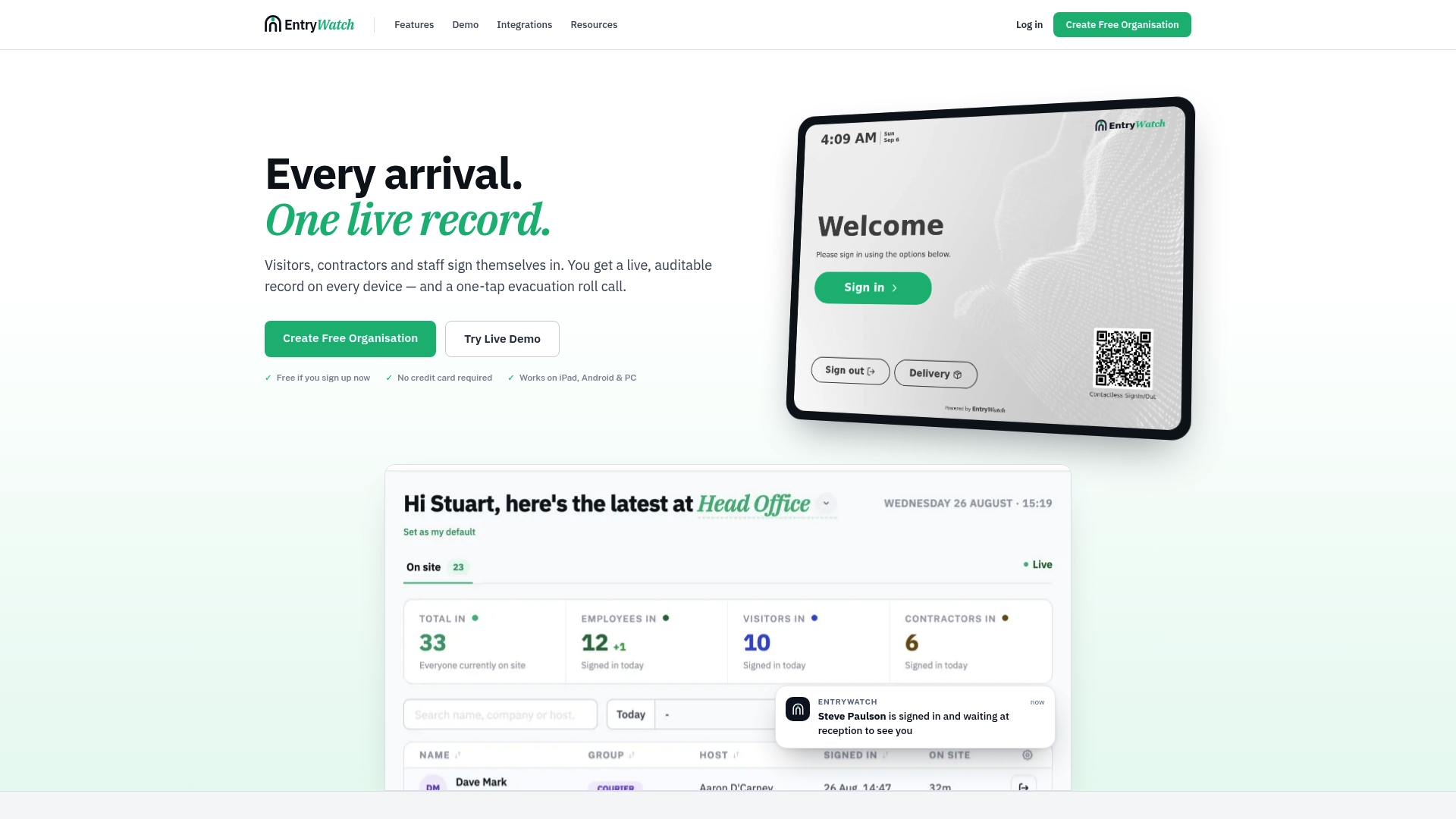
EntryWatch gives you a real-time, auditable visitor management system that logs every contractor, visitor, and employee sign-in with a timestamp you can hand directly to an auditor. Self-service kiosks can replace manual sign-in sheets, which are often incomplete or illegible during review. Automatic emergency roll calls provide presence evidence useful in safety or operational audits, avoiding reliance on memory to determine who was on site. Digital forms such as NDAs and site rules can be signed and stored electronically, making contractor induction evidence accessible before fieldwork.
If your next audit needs proof of on-site presence alongside your financial documentation, set up EntryWatch before your next site visit or fieldwork window.
Sources
- PCAOB Auditing Standard AS 1215 (audit documentation) — PCAOB
- Audit documentation checklist — Office of the Minnesota State Auditor
- Audit readiness checklist (HelpfuICFO) — PDF
- Audit trail review: step-by-step guide — AccountableHQ
FAQ
What Are the Steps in Audit Readiness?
Audit readiness moves through four stages: assessment, remediation, documentation, and fieldwork support. You assess gaps against prior findings, remediate weak controls and unreconciled items, assemble documentation into a PBC package, and then support fieldwork with a single point of contact who can answer auditor questions fast.
What Is an Audit Readiness Assessment?
An audit readiness assessment is a gap review comparing your current documentation, controls, and reconciliations against what an auditor will expect to see. It typically happens 8 to 12 weeks before fieldwork and identifies which items need remediation before the auditor arrives.
How Long Should Audit Trail Records Be Retained?
Records should generally be kept for at least seven years from the report release date under PCAOB documentation standards, though local regulations can require longer retention depending on your industry and jurisdiction.
What Belongs on a PBC List?
A prepared-by-client list should lead with the trial balance, bank reconciliations, AR/AP aging schedules, fixed asset and debt schedules, and prior-year findings with remediation evidence. Packaging these in one shared folder with a single point of contact reduces auditor follow-up requests significantly.
Can Visitor and Sign-In Logs Count as Audit Evidence?
Yes, in operational and safety-focused audits, a time-stamped visitor or staff sign-in record can serve as presence evidence the same way a reconciliation supports a financial balance. A system like EntryWatch captures that data automatically, including evacuation roll-call records auditors may request during safety compliance reviews.