%20--%3e%3cdefs%3e%3cstyle%3e%20.st0%20{%20fill:%20none;%20stroke:%20%230f172a;%20stroke-linecap:%20round;%20stroke-width:%205.5px;%20}%20.st1%20{%20fill:%20%2310b981;%20}%20%3c/style%3e%3c/defs%3e%3cpath%20class='st0'%20d='M2.75,42.01v-20.12C2.75,11.32,11.32,2.75,21.89,2.75s19.14,8.57,19.14,19.14v20.12'/%3e%3cpath%20class='st0'%20d='M14.12,42.01v-13.62c0-4.29,3.48-7.78,7.78-7.78s7.78,3.48,7.78,7.78v13.62'/%3e%3ccircle%20class='st1'%20cx='21.89'%20cy='11.74'%20r='4.98'/%3e%3c/svg%3e)
Privacy and Evacuation Ready Contactless Check In for Facilities & H&S

Contactless check-in replaces the paper sign-in sheet with a self-service kiosk, QR or remote check-in, and digital forms that feed into a real-time, auditable log. For most sites, the right move is a managed visitor-management system that pairs kiosk hardware with badge printing and connects to your emergency workflows, not a standalone app. EntryWatch is one system built around this combination, with live entry records designed for exactly this use case.
TL;DR:
- Contactless check-in systems should support badge printing, photo capture, and configurable forms to streamline visitor identification and health screening.
- Privacy-by-design practices require limiting data collection, setting automatic data deletion, and restricting log access to ensure compliance and protect visitor information.
- Integration with occupant emergency plans is critical, with visitor logs fed into roll-call workflows and tested through regular evacuation drills that include offline backup options.
- A phased rollout, starting with staff and contractor sign-in, helps iron out configuration issues before full self-service deployment, especially across multiple sites.
- EntryWatch offers an all-in-one platform with real-time logs, digital forms, emergency integration, and hardware options, with a free trial for initial testing.
Table of Contents
- Why contactless check-in matters for operations and safety teams
- Core features to require in a procurement checklist
- Turning privacy-by-design guidance into procurement requirements
- Making sure the system helps, not hinders, an evacuation
- Rolling out contactless check-in in phases
- Adapting contactless check-in for health crises
- Choosing between QR-only tools and full kiosk systems
- Where to evaluate a ready-to-deploy contactless check-in solution
- Sources
- FAQ
Why contactless check-in matters for operations and safety teams
A staffed reception desk creates a queue every time a shift change, a delivery, or a contractor arrival happens at once. A kiosk with QR pre-check-in absorbs that load without adding headcount, and it removes the shared pen, clipboard, and paper log that used to sit at every front desk.
The health and safety case is straightforward: fewer shared touchpoints, faster visitor flow, and a record that does not depend on legible handwriting. The compliance case is just as concrete. A digital log timestamps every entry and exit, tags visitors by type such as contractor, delivery, or guest, and gives you a searchable record instead of a stack of sign-in sheets in a drawer.
Some sites benefit more than others:
- Offices cut front-desk workload and give hosts automatic arrival notifications.
- Logistics and warehouse sites need fast, accurate contractor and driver tracking across shifts.
- Healthcare facilities require strict visitor classification and audit trails for infection control and security.
- Schools need badge printing and ID checks alongside straightforward volunteer tracking.
Core features to require in a procurement checklist
Whether you are writing a specification or comparing vendors, a short list of non-negotiables keeps evaluation focused. The following capabilities should appear in any serious contactless check-in system.
- Self-service kiosk support on iPad and Android, plus QR or remote pre-check-in for known visitors.
- Badge printing with photo capture at the point of sign-in.
- Configurable digital forms for NDAs, health declarations, and site rules, collected at check-in.
- Host notifications by email, SMS, Teams, or Slack the moment a visitor arrives.
- Real-time, auditable logs with export controls, multi-site support, single sign-on, and role-based access.
- Hardware compatibility with kiosk stands and badge printers, plus confirmed network and power access at each entry point.
Digital forms deserve particular attention during evaluation. A system that only handles sign-in but cannot capture a signed NDA or a health declaration will force you to keep a second, paper-based process alive, which defeats the point of going contactless. EntryWatch’s visitor management platform bundles these forms with sign-in and badge printing in one flow.
Pro Tip: Ask vendors for a live demo using your actual site’s network conditions, not a showroom Wi-Fi setup. Kiosk lag during a demo usually means kiosk lag on your loading dock.
Turning privacy-by-design guidance into procurement requirements
Privacy-by-design is not an abstract principle. The EDPB’s guidance on privacy by design and by default recommends embedding privacy requirements into purchase specifications and policy before deployment, and making layered information available to visitors so they know what is collected and why.
In practical terms, that means:
- Collect only the fields you actually need at check-in, not every field a form template offers.
- Set retention periods by visitor type and delete records automatically once they expire.
- Default to opt-out settings for anything beyond core sign-in data.
- Restrict who can export logs or respond to a data-subject request, separating that role from general kiosk administration.
If you are weighing whether to add ID scans or biometric check-in, treat that as a separate decision requiring a documented data protection impact assessment, an alternative check-in path for visitors who decline, and explicit informed consent rather than a checkbox buried in a form.
Privacy-by-design, done at procurement stage rather than after go-live, is described by the EDPB as the most effective way to meet data protection obligations, which is why it belongs in the RFP, not in a post-launch patch.
When you draft the vendor contract, request a data processing agreement, a written retention policy, export controls, and confirmation that audit logs are tamper-resistant. For high-security sites such as data centers, EntryWatch’s industry-specific guidance covers stricter access control configurations.
Making sure the system helps, not hinders, an evacuation
A visitor log that only exists for reception’s convenience is a missed opportunity. CISA’s Occupant Emergency Programs guide notes that visitor-management systems work best when they are built into the occupant emergency plan and used as an accountability tool during an actual incident, not treated as a separate administrative system.
That integration needs a few deliberate steps:
- Feed the live visitor log into your roll-call and mass-notification workflow, and name who is authorized to pull it during an incident.
- Run evacuation drills that specifically test the handoff from the kiosk log to the assembly-area headcount.
- Assign clear responsibilities to hosts, assembly-area leads, and the incident commander so nobody assumes someone else is checking the list.
- Keep a printed or cached offline roster as backup for when Wi-Fi or power fails during an emergency.
The Instructional Guide to the CISA EAP Template adds that facility management should maintain up-to-date rosters and point-of-contact information that first responders can use on arrival, which only works if the electronic and printed versions match.
Pro Tip: Schedule at least one drill per year specifically to test the visitor-log-to-roll-call handoff, not just the general evacuation route. EntryWatch’s evacuation management features are built around this exact handoff.
Rolling out contactless check-in in phases
A staged rollout gives staff time to adjust and gives you a chance to fix configuration problems before visitors ever touch a kiosk.
- Phase 1: Staff and contractor sign-in. Get your own people using the system first, and use this stage to confirm forms, notifications, and log accuracy.
- Phase 2: Supervised visitor kiosk pilot. Run the kiosk at reception with a staff member nearby to help visitors and catch any workflow issues.
- Phase 3: Full self-service with QR pre-registration. Open pre-check-in to expected visitors and let the kiosk run unsupervised.
Before each phase, confirm hardware siting: kiosk height and placement for accessibility, badge-printer location, and a stable network and power connection at every entry point. Update your SOPs, brief hosts and reception staff, and communicate the change to regular visitors and contractors before it goes live.
A small single site typically runs a pilot in 2 to 6 weeks, with full rollout following 4 to 8 weeks later. Multi-site programs need a longer planning window to account for varying network setups and local sign-in requirements at each location.
Pro Tip: Pair each rollout phase with a short refresher for reception staff. Most kiosk support tickets in the first month come from configuration confusion, not hardware faults.
Adapting contactless check-in for health crises
The COVID-19 pandemic pushed many sites toward contactless check-in for reasons beyond convenience. QR-based sign-in removed the shared touchscreen stylus and pen that circulated through hundreds of hands a day, and digital health declaration forms let sites screen for symptoms before a visitor entered the building.

That pattern remains useful outside a full-blown pandemic. A configurable digital form can ask health-screening questions during a seasonal flu spike or a localized outbreak, without needing new hardware or a new sign-in process. The same form infrastructure that captures an NDA can capture a temperature check confirmation or a symptom questionnaire, and it can be switched on or off as conditions change.
For sites in healthcare or education, this flexibility matters most. A hospital lobby or a school office needs to be able to tighten screening quickly and roll it back just as quickly once the risk passes, without retraining reception staff on a new system each time. Building this capability into your base contactless check-in configuration, rather than treating it as an emergency bolt-on, means you are ready before the next health event arrives rather than scrambling to configure one during it.
Choosing between QR-only tools and full kiosk systems
QR-only check-in works fine for low-volume or temporary sites, a pop-up event or a small office with a handful of daily visitors. Once you are dealing with contractors, healthcare visitors, or school volunteers, a kiosk with badge printing and photo capture earns its keep.
The most common mistakes are collecting more personal data than the site actually needs, treating the visitor log as separate from the emergency plan, and skipping staff training before go-live. After deployment, track check-in time per visitor, help-desk tickets per week, and how quickly a test roll-call resolves against the live log.
— Flipmind
Where to evaluate a ready-to-deploy contactless check-in solution
If the checklist above matches what you are trying to build, EntryWatch maps to it directly rather than requiring you to stitch several tools together. The platform combines contactless sign-in, self-service kiosks on iPad and Android, QR check-in, configurable digital forms, and automatic emergency roll calls in one system, with a real-time and auditable record of every entry.
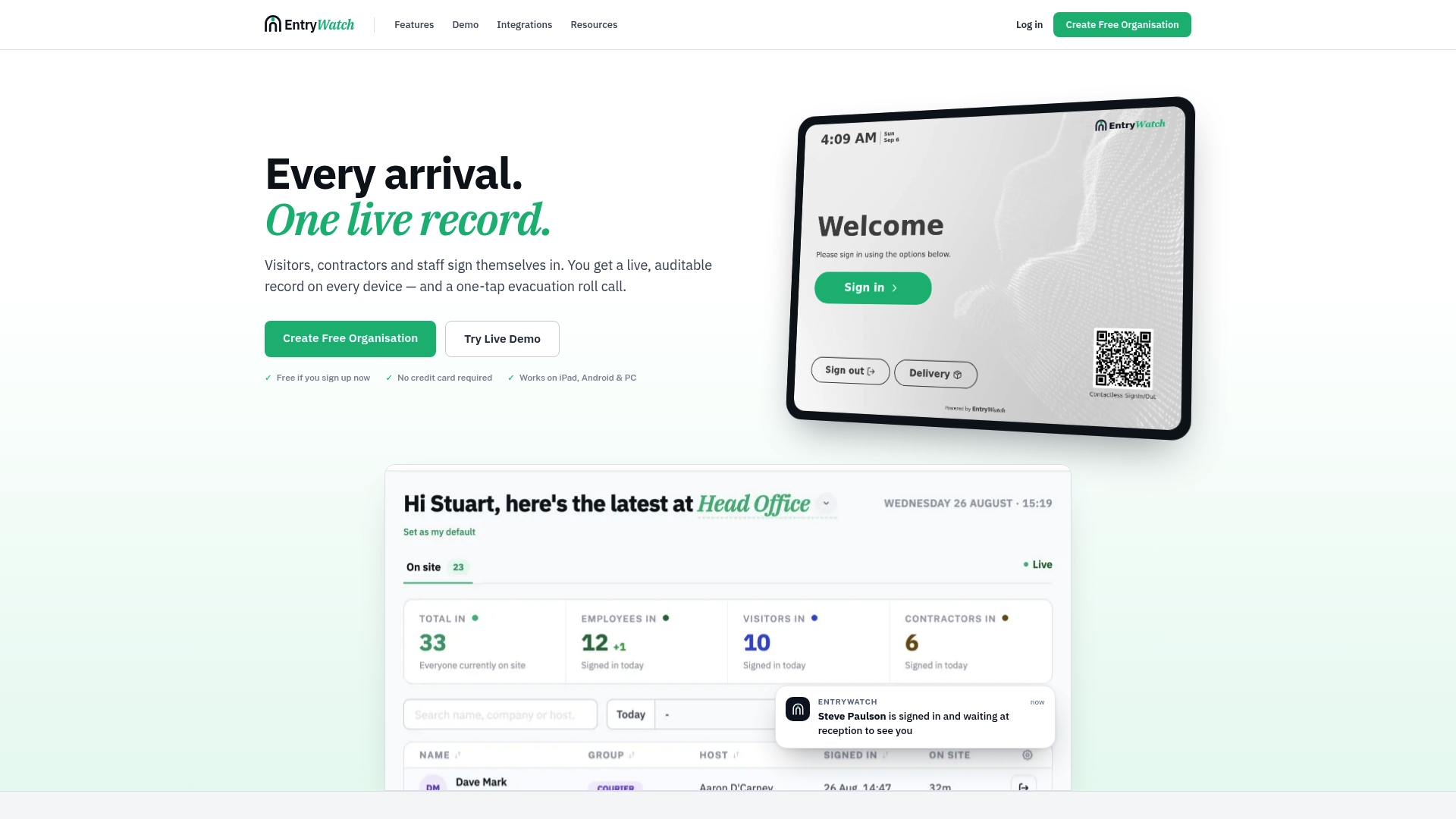
- Contactless sign-in and mobile kiosk support are covered natively, along with QR pre-check-in for known visitors.
- Digital forms handle NDAs, health declarations, and site rules without a separate paper process.
- Emergency roll calls draw directly from the live entry log, so your evacuation drills test the same system you use every day.
- Kiosk stands and badge printers are available through EntryWatch’s hardware page to match your site’s setup.
EntryWatch offers a founding plan free for early adopters for a limited period, which lowers the barrier to running a pilot before committing to a full rollout. If you want to see how the pieces fit together for your site, review pricing or start with the platform overview.
Sources
For data minimization and DPIA triggers, consult the EDPB’s privacy-by-design guidance. For accountability planning, see CISA’s Occupant Emergency Programs guide and the CISA EAP Instructional Guide. For school-specific badging policy, see the PASS visitor management white paper.
FAQ
What is contactless check-in for visitors?
Contactless check-in lets visitors, contractors, or staff sign in without touching a shared pen or screen, typically through a self-service kiosk, QR code, or remote pre-check-in. It produces a real-time digital log instead of a paper sign-in sheet.
Does contactless check-in help with emergency evacuations?
Yes, when the visitor log is built into the occupant emergency plan and tested with drills, according to CISA’s Occupant Emergency Programs guide. A live log only helps during an incident if staff have practiced pulling it for a roll call and have a printed backup ready.
What privacy steps should we take before deploying a kiosk system?
Limit the data fields you collect, set retention periods by visitor type, and restrict who can export logs, following the EDPB’s privacy-by-design guidance. If you are considering ID scans or biometrics, treat that as a separate decision requiring a documented impact assessment and an alternative check-in option.
How much does EntryWatch cost?
EntryWatch’s Founding plan is free for early adopters for a limited introductory period, with details on pricing. Hardware such as kiosk stands and badge printers is available separately through the hardware page.
How long does a contactless check-in rollout typically take?
A single site usually runs a pilot in 2 to 6 weeks, followed by full rollout in another 4 to 8 weeks. Multi-site programs take longer to plan because network setup and local requirements vary by location.