%20--%3e%3cdefs%3e%3cstyle%3e%20.st0%20{%20fill:%20none;%20stroke:%20%230f172a;%20stroke-linecap:%20round;%20stroke-width:%205.5px;%20}%20.st1%20{%20fill:%20%2310b981;%20}%20%3c/style%3e%3c/defs%3e%3cpath%20class='st0'%20d='M2.75,42.01v-20.12C2.75,11.32,11.32,2.75,21.89,2.75s19.14,8.57,19.14,19.14v20.12'/%3e%3cpath%20class='st0'%20d='M14.12,42.01v-13.62c0-4.29,3.48-7.78,7.78-7.78s7.78,3.48,7.78,7.78v13.62'/%3e%3ccircle%20class='st1'%20cx='21.89'%20cy='11.74'%20r='4.98'/%3e%3c/svg%3e)
7 Step Buying Workflow for Visitor Access Control for Facility Teams

Visitor access control is the system and policies that let you verify, grant, and audit temporary entry, fast and on record, while keeping people away from areas they have no reason to be in. Done right, it replaces the paper sign-in sheet with a live, searchable record of who is on-site, when they arrived, and where they are cleared to go. This guide walks through how the workflow operates, which features actually matter, how it connects to your broader access control systems, and what to ask vendors before you sign anything.
TL;DR:
- Most systems with contactless check-in and pre-registration can significantly reduce wait times and manual data entry during visitor arrivals.
- Integration with physical access control systems ensures consistent, real-time updates of visitor credentials and access permissions across all doors and sites.
- Emergency roll call features should be tested regularly to confirm they load and update within thirty seconds on mobile devices during evacuation drills.
- Features like audit logs, watchlist screening, and digital forms are vital for compliance and incident investigations, especially in sensitive environments like healthcare or data centers.
- Vendors should provide transparent, detailed information on compatibility with existing systems and security standards before procurement.
Table of Contents
- What Is Visitor Access Control and How Does It Fit Facility Security?
- How Does a Visitor Access Control Workflow Actually Run?
- What Features Should You Expect From a Modern System?
- How Does Visitor Access Control Connect to Your Access Control Systems?
- Who Actually Needs This, and What Does It Look Like by Industry?
- How Do You Choose the Right Visitor Access Control System?
- A Publisher’s View on What Actually Moves the Needle
- Get Set Up With Entry’s Visitor Management Platform
- Where to Go Deeper on the Standards Behind This
- Sources
- FAQ
What Is Visitor Access Control and How Does It Fit Facility Security?
Visitor access control is not the same discipline as managing permanent employee credentials, even though the two systems often share hardware and software. A staff badge is provisioned once and lives in your directory for months or years. A visitor credential is issued for hours, tied to a specific host and purpose, and should expire automatically. Treating both the same way is how facilities end up with stale guest badges still working six months after the meeting ended.
Security professionals generally organize controls into three layers, and a visitor system only works well when it reinforces all three rather than trying to replace them:
- Physical controls: locked doors, turnstiles, security guards, and barriers that stop unauthorized movement outright.
- Technical controls: badge readers, encrypted credentials, kiosks, and the software logic that decides who gets through which door.
- Administrative controls: sign-in policies, NDA requirements, background check rules, and escort procedures that govern human behavior around the technology.
That three-part breakdown comes straight from established access control theory, and it matters here because a lot of facility teams buy the technical layer and assume the job is done. It isn’t. A kiosk with facial recognition means nothing if there’s no policy for who gets escorted versus who gets left to wander.
The Interagency Security Committee’s facility access control guidance, developed for federally occupied buildings, frames the goal well: verify identity, authorize movement to specific areas, keep an auditable trail of the visit, and do it without turning your lobby into a bottleneck. That last point gets overlooked constantly. A system that’s airtight but causes long wait times at the front desk isn’t a security win. It’s a workaround waiting to happen, because staff will eventually just prop the door.
How Does a Visitor Access Control Workflow Actually Run?
Most modern systems follow a similar sequence from the moment a visit is scheduled to the moment the visitor leaves the building. Knowing this sequence helps you evaluate whether a vendor’s product covers your actual operational gaps or just the obvious ones.
- Pre-registration. Hosts schedule visits in advance using templates that define expected arrival windows, required documents, and site rules. Recurring visitors (a weekly contractor, for example) can reuse a saved profile instead of re-entering data every time.
- Arrival and check-in. The visitor checks in through a staffed reception desk, a self-service kiosk, or a QR code sent ahead of time. Contactless check-in has become the default expectation in most office and healthcare settings, not just a nice extra.
- ID capture and screening. The system captures a photo, scans an ID if required, and can cross-check names against a watchlist. Required acknowledgments (NDAs, health declarations, site safety rules) get signed digitally at this step.
- Credential issuance. Depending on the facility, the visitor receives a printed badge, a QR code, a mobile pass, a numeric entry code, or a temporary keycard tied to specific doors and a set expiry time.
- Movement and monitoring. Hosts get notified the moment their guest arrives, usually by email, SMS, or a message in Teams or Slack, so nobody’s left waiting in a lobby unannounced.
- Check-out and expiry. The visitor signs out, or the credential simply expires at the end of the scheduled window. Frequent visitors, like a contractor coming back weekly, can be converted into a semi-permanent profile instead of re-registering every visit.
- Emergency roll call. If an evacuation happens, the system should be able to pull a live, real-time list of everyone on-site, visitors included, so wardens can confirm headcounts against the assembly point instead of guessing.
That last step is where a lot of legacy paper-based systems fall apart completely. A sign-in book left at a reception desk that’s now on fire does nobody any good.
Pro Tip: Test the emergency roll call feature during a routine fire drill, not during an actual emergency. If the mobile roll-call list doesn’t load in under thirty seconds on a phone with no Wi-Fi, that’s a gap you want to find on a Tuesday afternoon, not during a real evacuation.
What Features Should You Expect From a Modern System?
Feature lists from vendors can blur together fast, so it helps to sort them by the operational problem each one actually solves rather than treating them as a checklist to skim.
- Self-service kiosks and contactless sign-in cut reception queues and reduce the number of shared touchpoints, which matters as much for throughput as for hygiene.
- Pre-registration with calendar integration means a host’s Outlook or Google Calendar invite can automatically trigger a visitor’s pre-registration, cutting manual data entry to near zero.
- ID scanning, photo capture, and watchlist screening give you a documented identity check rather than a guess based on a driver’s license glanced at across a desk.
- Temporary credential types should cover the range your facility needs: QR codes for a one-hour meeting, mobile passes for a week-long contractor visit, printed badges for events, and PIN codes for after-hours access.
- Integrations with PACS, HR systems, and SSO (SAML or OAuth) keep your visitor data in sync with your broader identity infrastructure instead of living in a separate silo.
- Messaging integrations with Teams or Slack get host notifications where staff already work, rather than relying on a separate app they forget to check.
- Audit logs and configurable retention turn every check-in into a searchable record, which matters enormously the one time you need to reconstruct who was in a building on a specific date.
- Multi-site support and kiosk branding let a company with several offices or venues run one system with location-specific rules and a consistent front-desk look.
None of these features individually solve security. Together, they replace guesswork with a record.
How Does Visitor Access Control Connect to Your Access Control Systems?
A visitor management platform that doesn’t talk to your physical access control system (PACS) creates two separate records of the same building, and that’s a problem the first time an incident investigation needs both. The strongest setups treat visitor management as the front door to the PACS, not a separate app running alongside it.
Integration typically works one of three ways: the visitor system provisions a temporary credential directly into the PACS (so a QR code or badge unlocks specific doors for a set window), it forwards check-in events to the PACS log for a consolidated timeline, or both systems sync against a shared identity directory like Microsoft Entra ID or Google Workspace so a visitor’s status updates everywhere at once.
A few technical issues come up often enough to ask about directly during vendor demos:
- Timestamp drift between the visitor system and the PACS can make an audit trail look inconsistent even when both logs are technically correct.
- Door ID mapping errors happen when a visitor credential is scoped to the wrong door group, granting access somewhere it shouldn’t.
- Permission mismatches occur when a visitor’s clearance in the VMS doesn’t match what’s actually configured in the PACS, usually because the two systems update on different schedules.
Done well, integration gives you one source of truth for investigations, accurate roll calls that don’t require cross-referencing two spreadsheets, and far less manual reconciliation at month-end reporting time.
Who Actually Needs This, and What Does It Look Like by Industry?
Visitor access control needs shift depending on what you’re protecting and how many people move through your doors on a given day.
- Office campuses lean on badge printing, mobile passes, and a branded kiosk experience that reflects well on the company for client visits.
- Healthcare facilities need stricter screening, visitor limitations tied to patient rooms, and clear escorting rules, since visitor access management in clinical settings carries compliance weight beyond general security.
- Logistics and warehouse sites rely on contractor induction workflows, scheduled access windows, and temporary credentials tied to delivery timeframes.
- Venues and conference centers need high-volume check-in that can process hundreds of guests in a short window without a line forming out the door.
- Schools and public-sector buildings combine safeguarding requirements, background check verification, and roll-call integration for lockdown drills, especially relevant given the scale of visitor volumes that larger campuses handle regularly.
- Data centers need the tightest audit trails of any category, with least-privilege movement and mandatory escorts for every visitor, no exceptions.
How Do You Choose the Right Visitor Access Control System?
Procurement conversations go faster when you walk in with a checklist instead of letting a sales demo set the agenda.
- Match capabilities to your actual workflow. Do you need kiosks, pre-registration, printed badges, mobile credentials, or all four? Skip features that sound impressive but solve a problem you don’t have.
- Verify security and compliance basics. Ask directly about encryption standards, role-based admin access, configurable data retention periods, and where visitor data is physically stored.
- Test the onboarding experience yourself. How long does setup actually take, and can a non-technical office manager run the admin panel without a training session?
- Confirm integration depth, not just integration existence. A vendor claiming “PACS integration” should be able to explain exactly which door systems, HR platforms, and SSO providers they support today, not on a future roadmap.
- Map out the full cost model. Subscription fees are one part. Hardware (kiosk stands, badge printers), professional services for setup, and per-site licensing can all add up separately.
- Watch for red flags. Vague answers about data retention, no clear emergency roll-call feature, or a demo that skips the admin dashboard entirely are all signs worth pausing on.
Pro Tip: Ask every vendor the same blunt question: “If the internet goes down mid-evacuation, what does my warden see?” The answer separates systems built for daily convenience from systems built for the one day it actually counts.
Security teams should also keep basic guard procedures aligned with whatever software they choose. A retail security checklist covering guard vetting and monitoring duties is a useful cross-check for the administrative layer that no software vendor can automate away.

A Publisher’s View on What Actually Moves the Needle
Most visitor access control pitches lead with the kiosk. It’s the visible part, so it gets the marketing budget. But the feature that separates a system worth trusting from one that just looks polished is the roll call. A facility manager doesn’t get judged on how smooth check-in felt on a normal Tuesday. They get judged on whether the warden had an accurate headcount ninety seconds after the fire alarm went off.

Entry was built around that priority. Its visitor management system pairs contactless sign-in and self-service kiosks with a real-time, auditable record designed specifically so an emergency roll call pulls an accurate list instantly rather than reconstructing one from memory. That maps directly onto the procurement checklist above: fast onboarding, kiosk hardware options, digital forms for NDAs and health declarations, and notification routing through email, SMS, Teams, or Slack so hosts and wardens both stay informed without extra software.
The unglamorous features are usually the ones that matter most when something actually goes wrong.
— Flipmind
Get Set Up With Entry’s Visitor Management Platform
A visitor access control platform can provide facility teams with a working visitor access control setup without the usual procurement drag: every feature included free for founding customers, with no add-on tiers to negotiate before testing the system on real visitors.
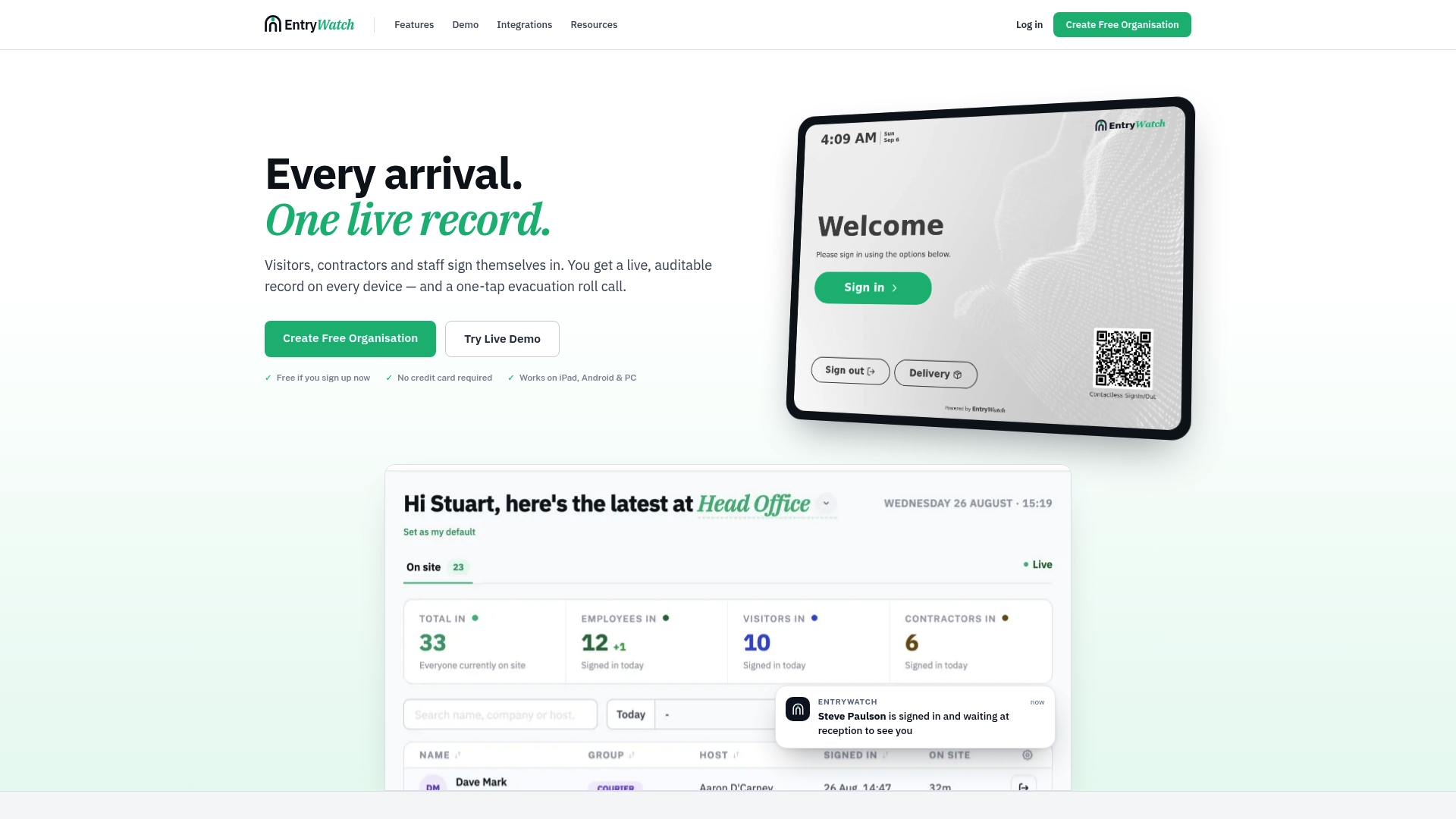
That means self-service kiosks, contactless sign-in, badge printing, digital forms, and emergency roll call are all live from day one, not locked behind a future upgrade. The platform is built for exactly the environments covered in this guide: offices running client meetings, healthcare sites managing screening requirements, and logistics facilities handling contractor inductions on a rolling basis. If you need physical hardware to go with it, Entry’s kiosk stands and badge printers cover the reception setup without sourcing equipment from a separate supplier.
Check current plans and pricing to see what’s included, or explore the full feature set to see how it lines up against the checklist above before you commit.
Where to Go Deeper on the Standards Behind This
For policy detail beyond this guide, the ISC/CISA facility access control best practices document covers escort levels and REAL ID considerations in depth. The access control taxonomy on Wikipedia is a solid reference for the physical, technical, and administrative categories referenced throughout this guide.
Sources
- Access control - Wikipedia
- Facility Access Control - An Interagency Security Committee Best Practice
- Visitor Access Management System — Directorate General of Shipping
- NCES — Education statistics tables
FAQ
What Are the Three Types of Access Control?
Access control breaks down into physical, technical (also called logical), and administrative categories. Physical controls include locks and guards, technical controls include badge readers and encryption, and administrative controls cover the policies, background checks, and procedures that govern how the other two get used.
What Is the Purpose of a Visitor Control System?
A visitor control system verifies identity, grants time-limited access to specific areas, and keeps an auditable record of every visit. The goal, per guidance on visitor access management, is to improve security and accountability while reducing the administrative load on reception staff.
What Is the Difference Between Access Control and Visitor Management?
Access control is the broader category covering how any person, staff or visitor, gets authorized to enter a space. Visitor management is a specific application of that within the visitor lifecycle: pre-registration, check-in, temporary credential issuance, and check-out, layered on top of the facility’s underlying access control infrastructure.
How Do You Handle Access Control and Visitor Management Together?
The most reliable approach connects your visitor management platform directly to your physical access control system so temporary credentials, event logs, and directory data stay synced across both. Entry’s visitor management platform is built around that kind of consolidated record, giving facility teams one auditable source instead of two disconnected logs to reconcile.
How Much Does Entry Cost?
Entry’s Founding plan is available now with details listed on the pricing page. Kiosk stands and badge printers are sold separately as hardware add-ons through Entry’s hardware page.