%20--%3e%3cdefs%3e%3cstyle%3e%20.st0%20{%20fill:%20none;%20stroke:%20%230f172a;%20stroke-linecap:%20round;%20stroke-width:%205.5px;%20}%20.st1%20{%20fill:%20%2310b981;%20}%20%3c/style%3e%3c/defs%3e%3cpath%20class='st0'%20d='M2.75,42.01v-20.12C2.75,11.32,11.32,2.75,21.89,2.75s19.14,8.57,19.14,19.14v20.12'/%3e%3cpath%20class='st0'%20d='M14.12,42.01v-13.62c0-4.29,3.48-7.78,7.78-7.78s7.78,3.48,7.78,7.78v13.62'/%3e%3ccircle%20class='st1'%20cx='21.89'%20cy='11.74'%20r='4.98'/%3e%3c/svg%3e)
EntryWatch: Two Week Visitor Parking Permits Pilot for Site Managers
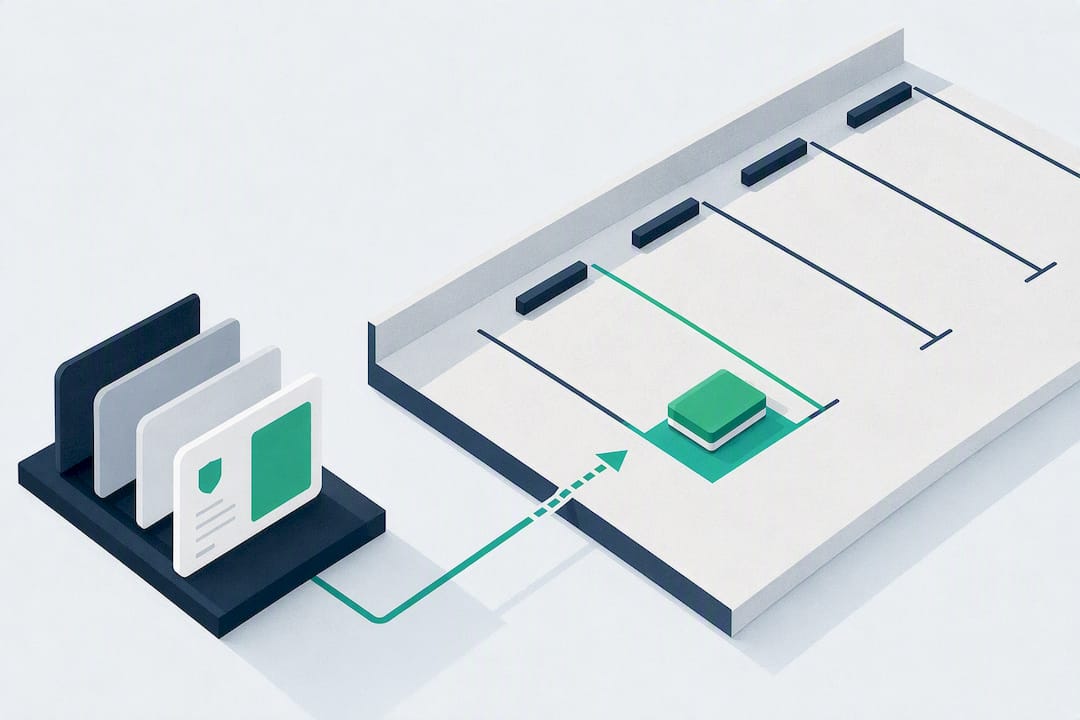
A digital visitor parking permit is a reservation issued through your visitor-management system that grants a specific vehicle access to a specific bay or zone during a set arrival window. The recommended approach is simple: issue permits before arrival, not at the gate. Doing so cuts reception queues, gives you a reliable evacuation roll-call, and eliminates the bay conflicts that come from first-come, first-served parking.
TL;DR:
- Digital permits should be issued before arrival to prevent parking conflicts and streamline entry, especially during peak times.
- Integration with access control systems, kiosks, and room booking ensures accurate, real-time verification and reduces manual oversight.
- Clear policies on duration, eligible visitor categories, and zone restrictions are essential to avoid disputes and maintain compliance.
- Automated expiration and fallback procedures are crucial to keep the permit whitelist current and handle system outages effectively.
- Tracking KPIs such as fulfillment rate, no-show rate, and peak demand helps optimize capacity management and improve visitor experience.
Table of Contents
- Why Visitor Parking Permits Matter for Your Site
- How a Digital Visitor Parking Permit Workflow Works
- Integration Points: Access Control, ANPR, Kiosks, and Room Booking
- Setting the Rules That Run the Program
- Linking Parking to Evacuation Roll Call and the Audit Log
- Defining Clear Policy Parameters Before You Launch
- Automating Permit Issuance and Expiration
- Staying Compliant on Parking and Data Privacy Rules
- Implementation Checklist for Deploying a Visitor Parking Permit System
- What to Look for in a Visitor-Management Vendor
- How EntryWatch Supports Visitor Parking Permits in Practice
- How to Pilot EntryWatch for Visitor Parking Permits
- Sources
- FAQ
Why Visitor Parking Permits Matter for Your Site
Manual visitor parking runs on guesswork. A guard waves a car toward “whatever’s open,” a receptionist scribbles a plate number on a sticky note, and by mid-morning two visitors are circling the same lot looking for a bay that was never actually free. That friction compounds at busy sites, where a single blocked bay can back up an entire entrance lane.
Digital permits fix the sequencing problem by moving the decision earlier. The visitor or their host requests a spot before the visit, the system checks capacity, and the permit is confirmed or declined in advance. Nobody discovers a full lot by driving into it.
The operational upside shows up in several places at once:
- Reception staff stop fielding “where do I park?” calls and questions at the desk.
- Visitor flow improves because directions to the correct bay or zone go out with the confirmation.
- Every entry becomes part of an auditable record tied to a name, vehicle, and time window.
- Security teams get a documented trail for incidents instead of a guess about who was on site.
Visitor parking works best when it’s treated as one part of a broader visitor-management process, where parking, sign-in, and host notification all run off the same request. Sites that still handle parking as a separate, informal system tend to be the ones fielding the most reception complaints.
How a Digital Visitor Parking Permit Workflow Works
A working permit system moves through four stages, and each one maps to a specific control point you can configure.
- Request. A visitor pre-registers through a booking link, a host submits the request on the visitor’s behalf, or the visitor requests a spot from a kiosk on arrival if no advance booking was made.
- Check. The system checks remaining capacity in the relevant zone against existing reservations. If space is available, it can approve automatically. If the request involves an accessible bay, an oversized vehicle, or a VIP visit, it routes to manual review instead.
- Grant. Approved requests generate a credential. That might be a QR code scanned at a barrier, a license plate added to an ANPR whitelist, or a printed pass for sites without camera-based enforcement.
- Notify. Confirmation goes to the visitor with arrival instructions (which entrance, which zone, how to reach reception) and to the host so they know when to expect their guest.
The sequencing matters more than the technology. A system that approves parking after the visitor has already left home solves nothing, because the visitor still arrives with no idea where to go. Connecting the parking request to the same booking as the meeting room closes that gap; if a visitor is confirmed for a 10 a.m. meeting, their parking bay should be confirmed at the same time, not handled as an afterthought at the gate.
This keeps most requests instant while still giving you a human check during high-demand periods, like an all-staff event or a board visit.
Integration Points: Access Control, ANPR, Kiosks, and Room Booking
A visitor parking permit is only as reliable as the systems it talks to. Four integration points come up on almost every deployment.
- ANPR and gate systems read the plate on arrival and match it against the approved list, removing the need for a guard to check a printed sheet.
- Self-service kiosks let a visitor without a pre-booked permit request one on arrival, print a badge, and get directions without a receptionist stepping away from other work.
- Room-booking systems should share data with the parking module so a confirmed meeting automatically triggers a parking check.
- Badge printers tie the parking credential to the same visual credential the visitor wears inside the building, so security can match a car to a badge at a glance.
The data that actually needs to pass between these systems is narrower than most teams assume: vehicle registration, the arrival window, the host’s name, and the assigned bay or zone. Everything else, like company name or visit purpose, can stay in the visitor record without cluttering the parking check.
License-plate-based credentials and digital passes are already standard tools for managing multiple visitor groups on complex sites, particularly hospitals juggling patients, families, contractors, and staff in the same lot. Office platforms typically support QR-code and plate-based visitor passes side by side, which lets a site choose the credential type per visitor category rather than forcing one method on everyone.
Every integration needs a fallback. If ANPR cameras go down or the kiosk loses connectivity, staff need a manual override, whether that’s a printed daily list at reception or a guard with radio access to the booking system. Build that fallback before you need it, not during an outage.
On privacy, vehicle registration and visitor names are personal data under most jurisdictions’ privacy frameworks. Set retention periods for parking logs the same way you set them for visitor sign-in records, and loop in legal or compliance before you decide how long ANPR images or plate data get stored.
Setting the Rules That Run the Program
Policy decisions determine whether your permit system runs smoothly or turns into a second source of complaints. Four areas need a documented answer before launch.
Eligibility and booking windows. Decide how far in advance a permit can be requested (same day only, or up to two weeks out) and the maximum stay duration per visit. Flexible, technology-driven booking rules generally outperform static, fixed allocations, especially at sites where visitor volume swings by day of week.
Priority and validation. Some categories need guaranteed access regardless of general capacity. Accessible bays must remain compliant with ADA and equivalent local accessibility rules. Hospitals commonly run validation programs with clear eligibility criteria to subsidize or exempt certain patient and visitor groups.
Enforcement. ANPR can flag unregistered vehicles automatically, but build in a grace window (10 to 15 minutes is common) before flagging a no-show bay for reassignment.
KPIs. Three numbers tell you whether the program is working:
| Metric | What it tells you |
|---|---|
| Permit fulfillment rate | Share of requests approved, denied, unused, or reassigned |
| No-show rate | How often a booked bay goes unused, signaling wasted capacity |
| Peak demand by time and zone | Where and when you need more bays or tighter booking windows |
Fulfillment rate specifically is one of the more useful metrics for spotting demand pressure before it turns into a full lot and a line of frustrated visitors.
Linking Parking to Evacuation Roll Call and the Audit Log
A visitor parking permit does more than assign a bay. It puts a vehicle, a driver, and an arrival time into the same record as everyone else on site, which matters the moment an evacuation alarm sounds.
When parking data lives inside your visitor-management system rather than a separate spreadsheet, the evacuation roll-call and the parking log pull from the same source. A warden running an assembly-point headcount can cross-reference who signed in, who has a live parking permit, and who has not yet checked out. That distinction matters during a real evacuation, because a car still in the lot with no matching sign-out is exactly the kind of discrepancy a warden needs flagged fast, not discovered after the fact.
The audit log serves a second purpose outside emergencies. If a vehicle is reported blocking a bay, damaged in the lot, or involved in an incident, the timestamped permit record shows exactly who was assigned there and when. That record holds up for insurance claims, security reviews, and any post-incident report a health-and-safety manager has to file.
Build the link once, at setup, rather than trying to reconcile two separate systems after something goes wrong. A parking permit that expires the moment a visitor signs out, and reactivates only on a new sign-in, keeps the roll-call and the lot record permanently in sync.
Defining Clear Policy Parameters Before You Launch
Every permit needs boundaries, and vague ones are what cause disputes at the gate. Three parameters need a written answer before your first visitor requests a spot.
Duration limits. Set a default maximum stay (two hours for a routine meeting, a full day for a contractor visit) and require manual approval for anything longer. Open-ended permits are the single biggest cause of bay conflicts, because nobody knows when the space frees up.
Eligible visitor categories. Not every guest needs the same access. A delivery driver, a job candidate, and a client attending a board meeting have different arrival patterns and different bay needs. Define categories in the system so the approval logic can apply different rules to each without a human deciding case by case.
Zone restrictions. Reserve accessible bays, loading zones, and executive or reserved-tier spaces separately from general visitor parking, and configure the system to block general requests from landing in a restricted zone by default. Reserved versus unreserved tiers are a standard tool in healthcare and campus parking programs for exactly this reason.
Write these parameters down as a one-page policy, not just as system settings. Reception and security staff need a plain-language reference when a visitor pushes back on a rule, and a documented policy is far easier to defend than “that’s just how the system is configured.”
Automating Permit Issuance and Expiration
Manual issuance is where visitor parking programs quietly fail. If someone has to remember to revoke a permit after the visit ends, permits pile up, phantom vehicles stay on the whitelist, and ANPR systems start approving cars that should no longer have access.
Automation solves this at both ends. On issuance, a confirmed request should generate the credential without anyone touching a keyboard, whether that’s a QR code, a plate added to the ANPR list, or a printed pass at a kiosk. On expiration, the permit should end automatically at the close of the booked window, or the moment the visitor signs out, whichever comes first.
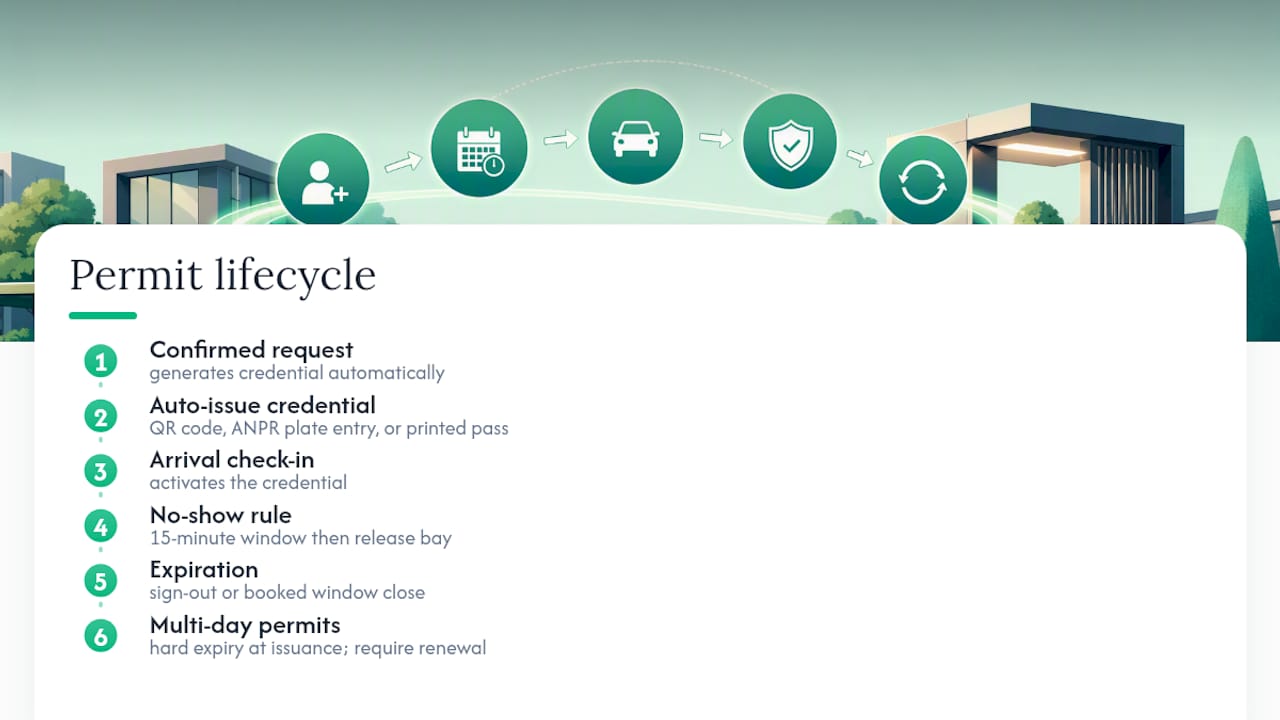
Building in a short confirmation window on arrival prevents long-term bay occupation by no-shows; if a vehicle doesn’t check in within, say, 15 minutes of the booked start time, the system can release the bay and reassign it. That single rule solves the most common complaint in any visitor lot: a bay held all morning for someone who never showed.
Multi-day permits for contractors or recurring vendors need the same discipline. Set a hard expiration date at issuance rather than leaving a permit open-ended, and require a renewal request rather than a silent extension. This keeps the whitelist accurate and gives you a clean audit trail showing exactly when each credential was active.
Staying Compliant on Parking and Data Privacy Rules
Two separate compliance questions apply to every visitor parking program, and they need separate answers.
The first is local parking regulation. Accessible bay requirements, signage rules, and enforcement authority vary by jurisdiction, and a digital permit system does not override any of them. If your system integrates with ANPR enforcement, confirm with legal counsel that automated flagging or fee assessment complies with local rules on notice and appeal before you switch it on.
The second is data privacy. Vehicle registration numbers, visitor names, and arrival timestamps are personal data under most privacy frameworks, and ANPR camera footage often carries additional handling requirements. Set a retention period for parking records that matches your visitor sign-in retention policy, document who can access the data, and confirm with your compliance team whether any parking data needs to be excluded from third-party integrations like room-booking or badge-printing systems.
Neither of these is a one-time check. Regulations shift, and a system configured correctly at launch can drift out of compliance if nobody revisits it. Assign an owner, usually the facilities or health-and-safety manager already responsible for the visitor-management program, to review both parking and privacy rules on a fixed schedule, at minimum once a year or whenever the system adds a new integration.
Implementation Checklist for Deploying a Visitor Parking Permit System
Deploying a permit system works best as a sequence, not a single launch event. Walk through these steps in order.
- Map your current parking flow. Document how visitors find bays today, where the queues form, and which zones need restrictions.
- Define policy parameters. Set duration limits, eligible visitor categories, and zone restrictions in writing before configuring the system.
- Choose your credential method. Decide between QR passes, license-plate whitelisting, printed passes, or a mix based on visitor type.
- Configure integrations. Connect ANPR or gate hardware, kiosks, room-booking systems, and badge printers, and confirm data fields (plate, arrival window, host, zone) pass correctly between them.
- Set automation rules. Configure automatic approval thresholds, no-show grace windows, and expiration triggers.
- Build the fallback plan. Document manual override procedures for outages, and train reception and security staff on them.
- Set retention and access rules. Confirm data retention periods and access permissions with legal or compliance before go-live.
- Run a limited pilot. Test on one entrance or one zone with a small group of bookings before rolling out site-wide.
- Track KPIs from day one. Monitor fulfillment rate, no-show rate, and peak demand as soon as the pilot starts, not after full rollout.
- Review and adjust. Revisit policy parameters and automation thresholds after 30 to 60 days based on what the KPIs show.
Each step feeds the next. Skipping the policy step and jumping straight to integrations is the most common mistake, because it leaves staff configuring a system with no agreed rules to build toward.
What to Look for in a Visitor-Management Vendor
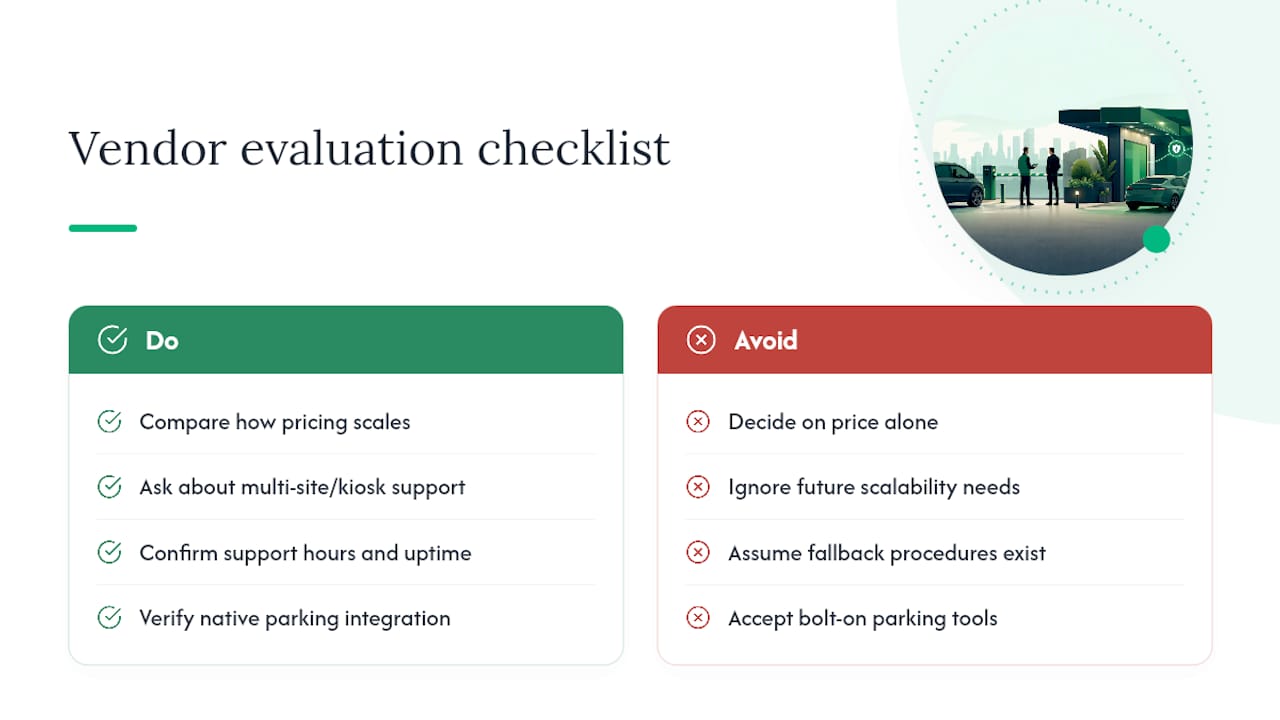
Cost is the obvious starting point, but it’s rarely the deciding factor once you compare options seriously. Look instead at how a vendor’s pricing scales: does it charge per site, per kiosk, or per visitor volume, and does that model still make sense if you add a second location next year?
Scalability matters more than most facilities teams expect at the outset. A system that works for one entrance and 20 visitors a day needs to keep working, without a full reconfiguration, if you add a second building or a warehouse dock with a different traffic pattern. Ask specifically about multi-site and multi-kiosk support before you commit.
Support services separate vendors more than feature lists do. Find out what happens when the ANPR camera goes offline at 7 a.m. on a Monday: is there a support line, a documented fallback procedure, or are you on your own until someone gets back to you? A vendor’s uptime record and stated support hours are worth confirming directly rather than assuming.
Finally, check whether the platform handles visitor parking as a native part of the visitor-management workflow, or as a bolted-on add-on. A permit system that lives inside the same platform as sign-in, badge printing, and evacuation roll-call keeps every record in one place. A separate parking tool means reconciling two systems every time something goes wrong, which is exactly the kind of gap that shows up during an incident review.
How EntryWatch Supports Visitor Parking Permits in Practice
EntryWatch’s visitor management platform maps directly onto the workflow this guide describes. The self-service kiosk lets a visitor request a parking spot and print a badge without waiting on reception, and vehicle registration captured at booking feeds the same record used for sign-in and sign-out.
That record does double duty during an emergency: the evacuation roll-call draws from the same live data, so a warden can confirm who is on site and cross-check that against the parking log. Offices use this to keep reception moving during busy weeks, hospitals use it to track family and contractor vehicles alongside patient visitors, and event venues use it to manage short-term guest access without a manual sign-in sheet at the door.
How to Pilot EntryWatch for Visitor Parking Permits
Testing a permit system doesn’t require a full rollout. Run it on one entrance, with a limited number of bays, and pre-booked visitors only for the first two weeks. That scope is small enough to catch configuration problems fast and large enough to generate real fulfillment and no-show data.
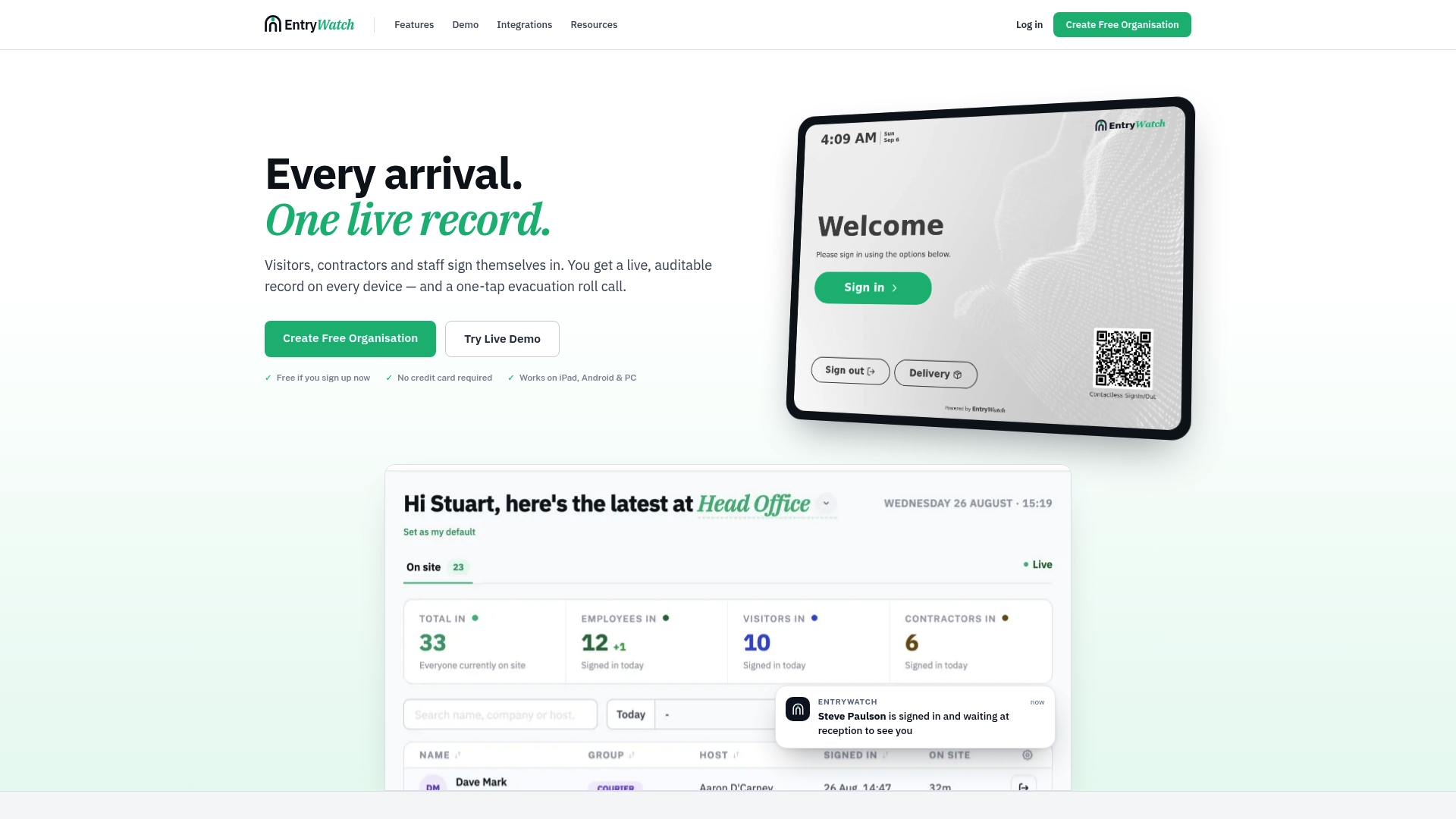
A useful pilot checklist covers four things: kiosk setup at your busiest entrance, plate capture or QR scanning at the gate, badge printing tied to the same visitor record, and a test run of the evacuation roll-call report during a scheduled fire drill rather than waiting for a real emergency to find out if it works.
EntryWatch’s self-service kiosk and evacuation roll-call features are both live records feeding the same visitor log, which is exactly what a pilot needs to test: one system, one audit trail, one badge printer at the front desk instead of three disconnected tools. Facilities and health-and-safety managers can start with the free tier to run this exact two-week test at no cost before deciding whether to expand it site-wide. If your site runs multiple entrances or handles high visitor volume, request a demo through EntryWatch’s homepage to walk through configuration options specific to your layout.
Sources
- Automated Visitor Management in 2026 | Ronspot
- Hospital and Healthcare Parking Operations: A Facility Manager’s Guide | Facility Parking Guide
- Hospital Parking Management | Best Practices & Solutions
- Office Parking Management Software | Digital Permits & ANPR | Autlo
FAQ
What Is a Digital Visitor Parking Permit?
It’s a reservation issued through a visitor-management system that grants a specific vehicle access to a bay or zone during a defined arrival window, replacing manual, on-the-spot parking decisions.
How Far in Advance Should Visitors Book a Parking Permit?
Most sites allow requests from same-day up to two weeks ahead, though the right window depends on how predictable your visitor volume is and how tight your capacity runs.
Can Visitor Parking Permits Link to Evacuation Roll Call?
Yes, when parking data lives inside the same platform as sign-in records. EntryWatch ties vehicle registration and arrival data to the same live record used for its evacuation roll-call, so wardens can cross-check who’s on site during an emergency.
What Happens if a Visitor Doesn’t Show Up for a Booked Bay?
A grace window, typically 10 to 15 minutes, gives the system time to confirm arrival before automatically releasing and reassigning the bay to prevent wasted capacity.
Do Visitor Parking Permits Need to Address Data Privacy?
Yes. Vehicle registration and visitor details count as personal data under most privacy frameworks, so retention periods and access controls should match the rules already applied to visitor sign-in records.