%20--%3e%3cdefs%3e%3cstyle%3e%20.st0%20{%20fill:%20none;%20stroke:%20%230f172a;%20stroke-linecap:%20round;%20stroke-width:%205.5px;%20}%20.st1%20{%20fill:%20%2310b981;%20}%20%3c/style%3e%3c/defs%3e%3cpath%20class='st0'%20d='M2.75,42.01v-20.12C2.75,11.32,11.32,2.75,21.89,2.75s19.14,8.57,19.14,19.14v20.12'/%3e%3cpath%20class='st0'%20d='M14.12,42.01v-13.62c0-4.29,3.48-7.78,7.78-7.78s7.78,3.48,7.78,7.78v13.62'/%3e%3ccircle%20class='st1'%20cx='21.89'%20cy='11.74'%20r='4.98'/%3e%3c/svg%3e)
90 Day Contractor Compliance Plan for Safety Managers in Construction

Contractor compliance management means centralizing verification and lifecycle control over every third-party contractor on your sites, from tax ID to final closeout. The immediate action to take is straightforward: build a pre-mobilization checklist and pair it with automated expiry and renewal tracking. Do that first, before you touch software or process redesign, and you close most of the gaps that lead to fines, injuries, or a failed audit.
TL;DR:
- Regularly verify contractor insurance with endorsed policies to ensure coverage is active and applies to your project, not just the certificate.
- Automate expiry alerts and link compliance status to payment and permit systems to prevent lapses from causing safety or legal issues.
- Conduct classification checks upfront, then follow a fixed onboarding process, including site orientation and hazard training, to maintain audit readiness.
- Use contactless sign-in systems and real-time logs to streamline contractor entry and improve safety during emergencies on high-turnover sites.
- Implement a 90-day compliance tightening plan, focusing on inventory, automated checks, and pilot programs to sustain contractor regulation without disrupting operations.
Table of Contents
- What Contractor Compliance Management Actually Covers
- The High-Risk Consequences: Why Contractor Compliance Matters
- Pre-Mobilization Checklist: What to Collect Before Anyone Steps on Site
- Ongoing Monitoring: Keeping Records Current Without Losing Track
- Operational Workflows: From Classification Check to Audit-Ready Records
- How Technology Supports Contractor Compliance: Features Worth Prioritizing
- A Practical Example: How Sign-In Systems Reduce Compliance Friction
- The 90-Day Plan: Tightening Compliance Without Overhauling Everything at Once
- Where EntryWatch Fits Into Your Compliance Program
- Checklists and Guidance Worth Bookmarking
- Sources
What Contractor Compliance Management Actually Covers
Contractor compliance management runs the full lifecycle: prequalification, onboarding, ongoing monitoring, and closeout. Each stage hands off to the next, and skipping one usually means repeating work later under worse conditions, often mid-audit.
The program rests on four operational pillars. Miss one and the whole structure gets shaky:
- Legal identity — confirming the contractor is a real, registered entity with a valid tax ID
- Insurance and endorsements — verifying coverage actually protects you, not just the contractor
- Safety credentials — checking certifications match the work being performed
- Accounting and payment gates — blocking invoices until compliance status is current
Before any of that, you verify classification. Getting employment status wrong at the start can unravel every downstream compliance step you have already completed, because a reclassified worker triggers a different set of legal obligations entirely.
The High-Risk Consequences: Why Contractor Compliance Matters
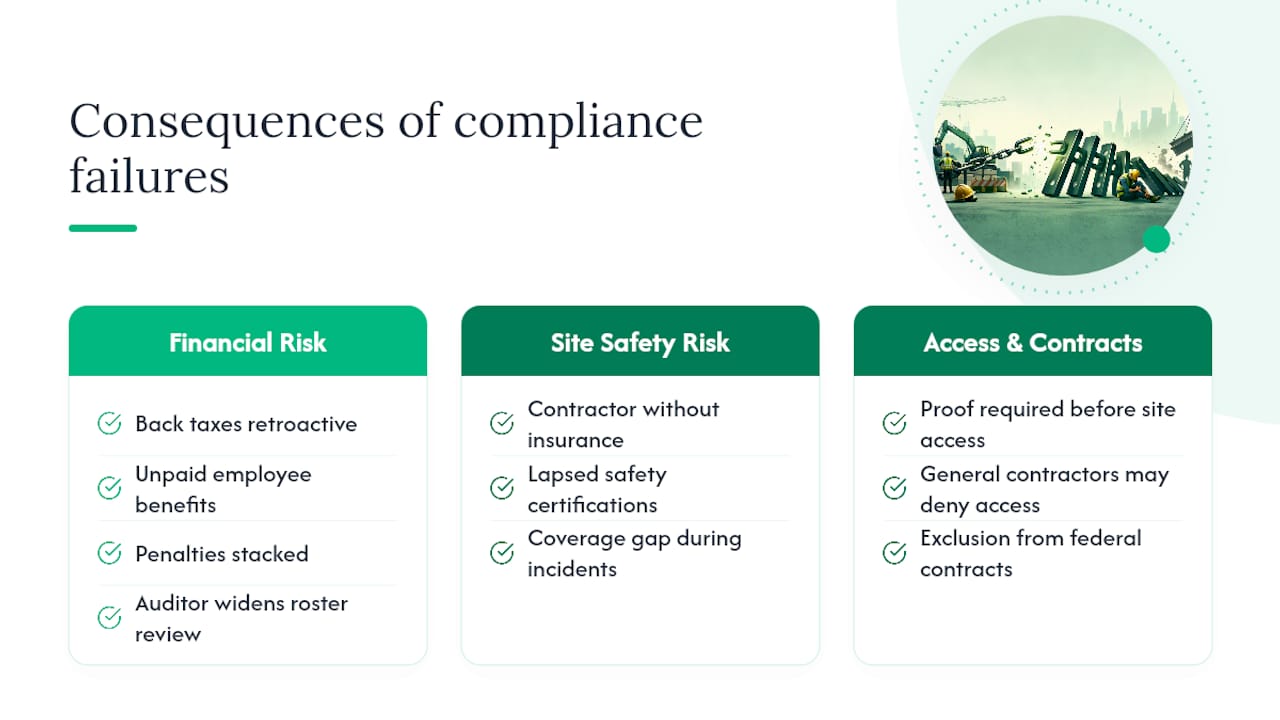
Misclassifying a contractor as an independent worker instead of an employee is the single most expensive mistake in this field. If a regulator later determines the classification was wrong, the correction applies retroactively, which means back taxes, unpaid benefits, and penalties stacked on top of work you thought was already compliant.
Pro Tip: Reclassification risk doesn’t stay contained to one worker. If an auditor finds one misclassified contractor, they typically widen the review to your entire contractor roster.
Site safety consequences run parallel to the financial exposure. A contractor working without an active insurance policy or a lapsed safety certification creates a coverage gap that surfaces exactly when you need it least, during an incident investigation. General contractors and site owners increasingly demand proof of compliance before allowing access at all, and government buyers can face exclusion from federal contract opportunities entirely when compliance failures pile up.
Pre-Mobilization Checklist: What to Collect Before Anyone Steps on Site
No contractor should set foot on a job site until this checklist clears. Treat it as a gate, not a formality.
-
Legal and tax documentation. Collect a completed W-9 or equivalent tax ID form, articles of incorporation or LLC registration, current trade licenses, and an executed Master Service Agreement before scheduling any work.
-
Insurance verification. An ACORD 25 certificate is the starting point, not the finish line. You need to inspect the underlying endorsements, particularly CG 20 10 and CG 20 37 for Additional Insured status and CG 24 04 for waiver of subrogation, to confirm the coverage actually applies to your project rather than sitting unused in a policy schedule. Call the broker or carrier directly to confirm the policy is active. A certificate alone tells you almost nothing about whether the coverage is real on the dates that matter.
-
Safety and performance credentials. Verify OSHA 10 or 30 cards for the specific trades involved, pull the contractor’s Experience Modification Rate, and review OSHA 300 and 300A logs for a pattern of recordable incidents.
-
Payment and lien controls. Set up conditional lien waivers tied to each payment cycle, hold payments automatically when documentation lapses, and gate invoicing behind a current compliance status check.
Pro Tip: Store copies of every endorsement page, not just the certificate summary. Certificates get updated; the endorsement language underneath sometimes doesn’t match what the broker told you.
Ongoing Monitoring: Keeping Records Current Without Losing Track
A compliant contractor on day one can be non-compliant by day sixty if nobody is watching the calendar. Set renewal buffers of 30 to 60 days before any document expires, and route automated reminders directly to the contractor’s broker or agent, not just the contractor.
Build these checks into your weekly rhythm:
- Run daily or weekly readiness scans against active site rosters
- Integrate compliance status with permit-to-work systems so an expired document blocks the permit automatically
- Link compliance status to your accounting platform so payment holds trigger without manual intervention
- Define an escalation path: who gets notified, how fast, and what corrective action follows a lapse
| Trigger | Response Window | Action |
|---|---|---|
| Insurance expires soon | Immediate | Automated reminder to broker and contractor |
| Insurance lapses | Same day | Site access and payment hold activated |
| Safety certification expires | 30 days | Reassignment or retraining scheduled |
| Repeated lapse pattern | Next review cycle | Escalation to procurement for contract review |
This structure works because automating expiry management and tying it to payment holds is one of the highest-impact controls available. It removes the human memory lapse that causes most compliance gaps in the first place.
Operational Workflows: From Classification Check to Audit-Ready Records
Run classification checks before you collect a single document. Document the control, method, and place-of-work analysis in writing, because that reasoning is what protects you if a regulator questions the classification later.
Once classification clears, the onboarding sequence follows a fixed order:
- Prequalification review of the contractor’s compliance file
- Site orientation covering hazards, evacuation routes, and site rules
- Permit-to-work assignment matched to the specific scope
- Daily form completion for hazard checks and toolbox talks
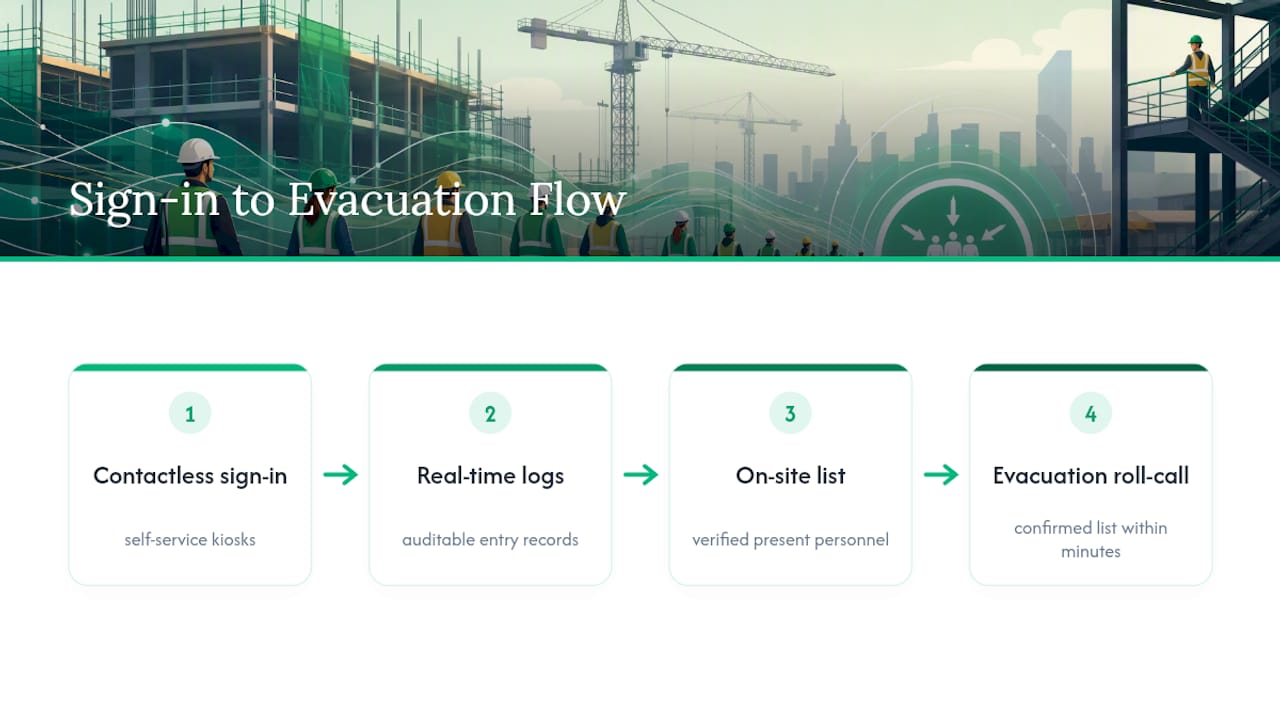
Field controls should reinforce, not replace, this sequence. Kiosk sign-in and QR-based onboarding speed up daily entry, host notifications alert the right supervisor when a contractor arrives, and evacuation roll-call confirms who is actually on site during an emergency. Keep every record tied to its specific project and invoice. When an audit request lands, you want a file that answers the question before it’s fully asked.
How Technology Supports Contractor Compliance: Features Worth Prioritizing
Software earns its cost by removing manual tracking, not by adding another dashboard nobody checks. Prioritize:
- Automated expiry alerts with document OCR that pulls policy dates without manual entry
- Auditable logs that timestamp every verification and status change
- Mobile or QR-based onboarding that lets contractors self-register in the field
- Integration with accounting for payment holds, permit-to-work systems, and directory platforms like Google Workspace or Microsoft Entra ID
Lifecycle-focused contractor management platforms that connect prequalification through post-job review give safety teams broader visibility into risk across a contractor base, rather than a snapshot at one point in time.
Pro Tip: Worker-held profiles that a contractor carries between job sites cut down redundant onboarding paperwork, and field adoption improves noticeably when workers aren’t forced to log in through a separate portal every time.
Data controls matter just as much as features. Set retention periods aligned with your audit window, restrict access by role, and keep personal information limited to what compliance actually requires.
A Practical Example: How Sign-In Systems Reduce Compliance Friction
Consider how a visitor and contractor sign-in system changes daily operations on a busy site. Contactless sign-in and self-service kiosks eliminate the reception bottleneck that slows down contractor arrivals during peak hours, especially on multi-crew sites with staggered start times.
Real-time, auditable entry logs mean you know exactly who is on site at any moment, and evacuation roll-call turns a chaotic headcount into a confirmed list within minutes. That combination matters most in construction and manufacturing environments, where logistics yards and engineering sites see constant contractor turnover and where knowing who’s inside the fence line during an emergency isn’t optional.
The 90-Day Plan: Tightening Compliance Without Overhauling Everything at Once
Weeks one through four: inventory every active contractor, run risk triage on your highest-exposure sites, and re-check classification status for anyone with an ambiguous work arrangement. This is unglamorous work, and it’s where most of the risk actually hides.
Weeks five through eight: lock the pre-mobilization checklist into a hard gate, no exceptions, and connect it to a payment hold so non-compliant invoices can’t slip through.
Weeks nine through twelve: pilot expiry automation on one site and test kiosk or QR onboarding with a single crew before rolling it out wider.
Track three numbers throughout: your compliance-at-mobilization rate, the number of expired-policy incidents you avoided, and how long verification takes from document submission to approval. Those three tell you whether the program is actually working, not just whether it looks organized on paper.
— Flipmind
Where EntryWatch Fits Into Your Compliance Program
You’ve built the checklist. You’ve automated the expiry tracking. The piece that still eats admin time on most sites is the physical sign-in process itself, and that’s where a visitor management system built for contractor traffic makes the difference.

Contactless sign-in and self-service kiosks pull contractors through the gate without a reception queue, while real-time entry logs give you an auditable record the moment an inspector asks for one. The evacuation roll-call feature turns headcounts during a site emergency from a guessing exercise into a confirmed list in minutes, which matters most on exactly the kind of site where compliance failures carry real safety consequences.
If you manage contractor traffic across construction, manufacturing, or logistics sites, pilot mobile kiosk sign-in at one high-risk location and see how much reception time it actually saves before rolling it out further.
Checklists and Guidance Worth Bookmarking
For deeper reference, the Vendor Compliance Checklist for Contractors breaks down insurance endorsement checks in detail. The Contractor Compliance Checklist on LegalClarity covers classification and tax exposure. For field-level feature comparisons, SALUS Safety’s subcontractor platform overview is worth a look.
Sources
- Vendor Compliance Checklist for Contractors (2026) — SubDoc
- Contractor Compliance Checklist: Hiring, Taxes & Oversight — LegalClarity
- Contractor Management Software & Safety Solutions — Cority
- Subcontractor management platform features — SALUS Safety